

EX-ZR50
Wi-Fi function

Useful Wireless LAN Function -Great during shooting and after shooting.
By installing the dedicated “EXILIM Remote” app on your smartphone, you can use the ZR50’s Wi-Fi function for an even more enjoyable experience.


* App may not work on some smartphone models.
* Check Google Play or App Store for OS versions that are compatible with the app.
* App specifications and system compatibility are subject to change without notice.
[ Remote Capture from your Smartphone ]
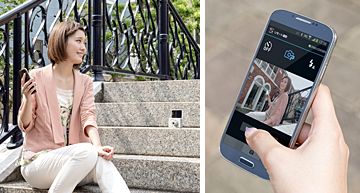
From your smartphone display, you can easily set up compositions, angles, and poses as well as release the shutter. This means you can shoot even better self-portraits.
·
Shooting stills (Premium Auto Pro, Program Auto, CS, Pre-record CS)
·
Movie shooting
*1
·
Flash On/Off (Auto, Red Eye Reduction, Flash On, Flash Off)
*2
·
Self-timer (10 sec, 2 sec, × 3)
·
Zoom
·
Recording mode (still images, movies) switching
*1 Video is STD (standard) image quality only.
*2 Not allowed by some recording modes.
[ Sending Images to a Smartphone ]
You can send captured images to a smartphone.
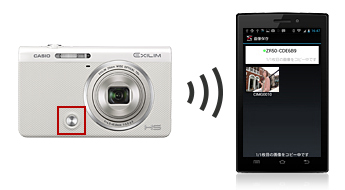
<Quick Send>
Press the front shutter to send the image displayed
in playback mode to a smartphone.
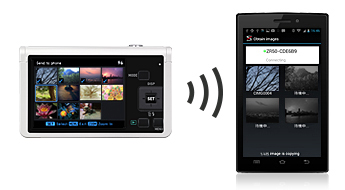
<Multi-Send>
Sets of selected images are transmitted simultaneously.
*
Up to 100 still images / movies, or up to a total of 500 MB,
can be transmitted as a single set.
Send all images taken in a day as a single batch. When you resend an updated batch, images other than those previously sent will be added to the batch.
*
Up to 100 still images / movies, or up to a total of 500 MB,
can be transmitted as a single set.
Easily upload to SNS
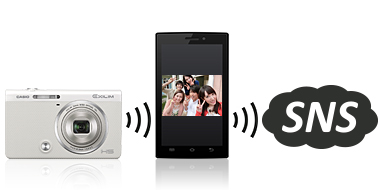
After sending images from the camera to your smartphone, you can immediately upload the images to SNS sites.
* It is available in iOS 6 or later version.
* Smartphone must be pre-installed with the SNS application that is to be used for uploads.
* The SNS application has to be set up before use.
[ Conveniently check images on your smartphone or PC ]
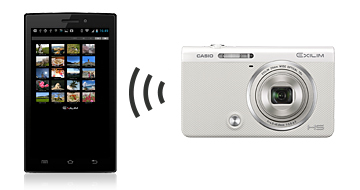
Images stored in the camera can be viewed, saved, etc. on your smartphone or a PC’s WEB browser without installing the dedicated app.
· The ZR50 can be simultaneously connected with up to a total of 8 devices such as smartphones or PCs.
NEW [ Accessing the “Scene” smartphone app ]
You can very conveniently view, sort and share images at high speed by using the “Scene” access function of the “EXILIM Remote” app. The “Scene” smartphone app can be easily accessed from the “EXILIM Remote” app’s TOP screen or the screen displayed after sending images.

“Scene” is a smartphone app that is specifically designed for “enjoying pictures on your smartphone”. It features a simple and intuitive interface for quickly searching any desired image, and easily sorting photos in your album with the touch of your finger. Other features include the capability to send friends a maximum of 1,000 shots at one time for as many times as you may want.
All images shown here are simulations for explanatory purposes only.
Actual images may appear different from those shown here. Designs and specifications are subject to change without notice.